Bluetooth Settings
BluetoothSettingsConnectionConnectionsBluetooth
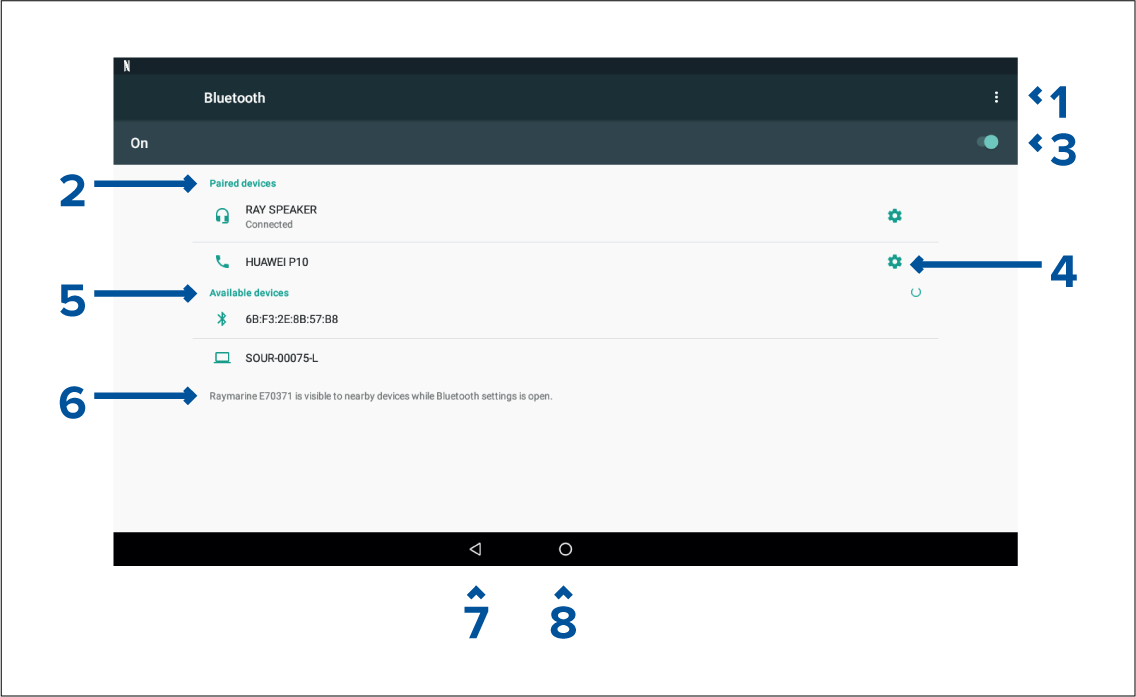
- Bluetooth options — Provides the following options:
Refresh — Selecting refreshes the list of available devices.
Rename this device — Allows you to rename the Bluetooth name your MFD uses.
Show file received — Not used as your MFD cannot receive files over Bluetooth.
Paired devices — List of devices paired with your ~MFD.
Enable/Disable Bluetooth.
Paired device settings — Allows you to rename the paired device or forget the device.
Available devices — List of available Bluetooth devices.
MFD Bluetooth name.
Back button.
Home button.