Anchor mode
Anchor mode should be used when your vessel is at anchor. Anchor mode uses your vessel’s GNSS (GPS) position to record your location when your anchor hits the bottom. This feature calculates whether your vessel has dragged its anchor from its original location (based on specified values), and then triggers the Anchor drag alarm. To activate this alarm, the Anchoring wizard must be completed.
Anchor mode does not take into account effects that tide may have on chain length or depth values.
Before Anchor mode can be used, the system requires the following details:
GNSS (GPS) position — via a connected receiver.
Depth — via a connected transducer. Alternatively, depth can be set manually in the Anchor mode settings.
Length of your vessel (bow to stern) — this is the value specified in the Boat length field.
GNSS (GPS) receiver distance from vessel’s bow — this is the value specified in the Bow to GPS field.
Boat length and Bow to GPS can be set in the Boat details settings tab: . If the values have not been set, you will be prompted to enter them when activating Anchor mode for the first time.
Anchor mode uses the following data, measurements, and calculations:
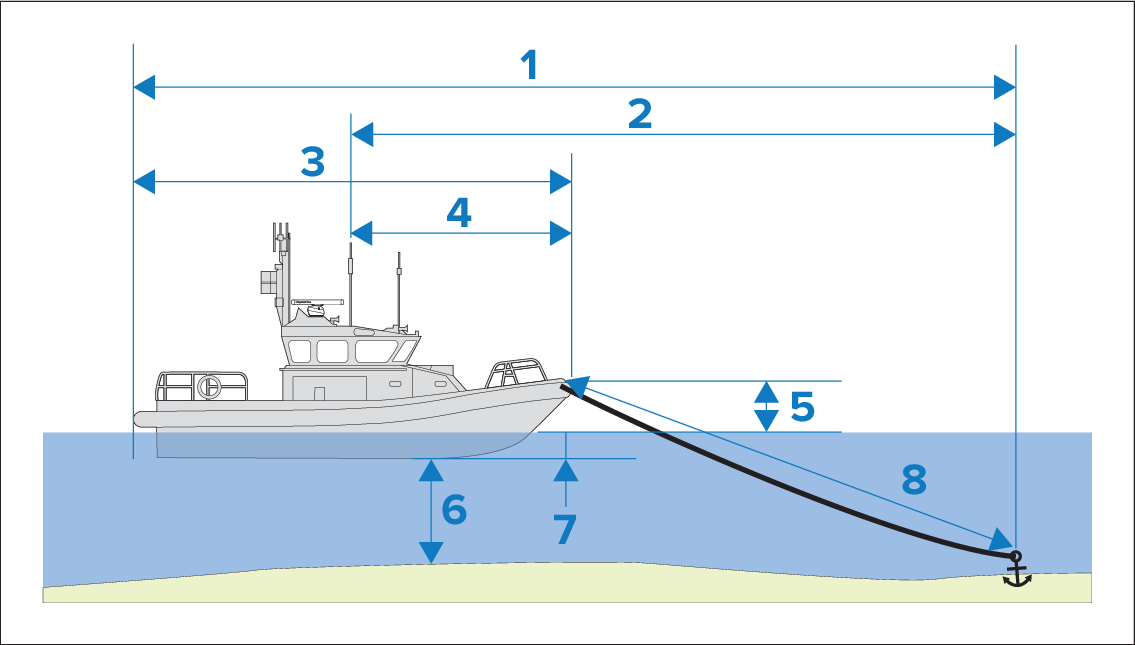
Maximum swing radius — this calculation is determined using Boat length, Bow to GPS distance, Chain length and Depth.
Drag limit — this calculation is determined using Maximum swing radius, Boat length and Bow to GPS distance.
Boat length — user-defined measurement.
Bow to GPS — user-defined measurement.
Waterline to deck — One meter is added to the calculation to allow for the distance from the waterline to the deck.
Depth — data received from a depth transducer.
Depth offset — the specified depth offset is added to the calculation. The depth offset is based on your transducer settings (zero if Below transducer is selected; positive value if Below waterline is selected; negative value if Below keel is selected.) Refer to: Depth offset
Chain length — default calculation based on 4 times (4x) depth. Chain length can be altered manually to specify actual chain length.
The anchor drag alarm is triggered if your GNSS (GPS) receiver passes the distance from the original anchor position by the specified drag limit distance.
When anchor mode is active, a track of your vessel’s movements will be recorded and representative graphics displayed onscreen in the chart app.
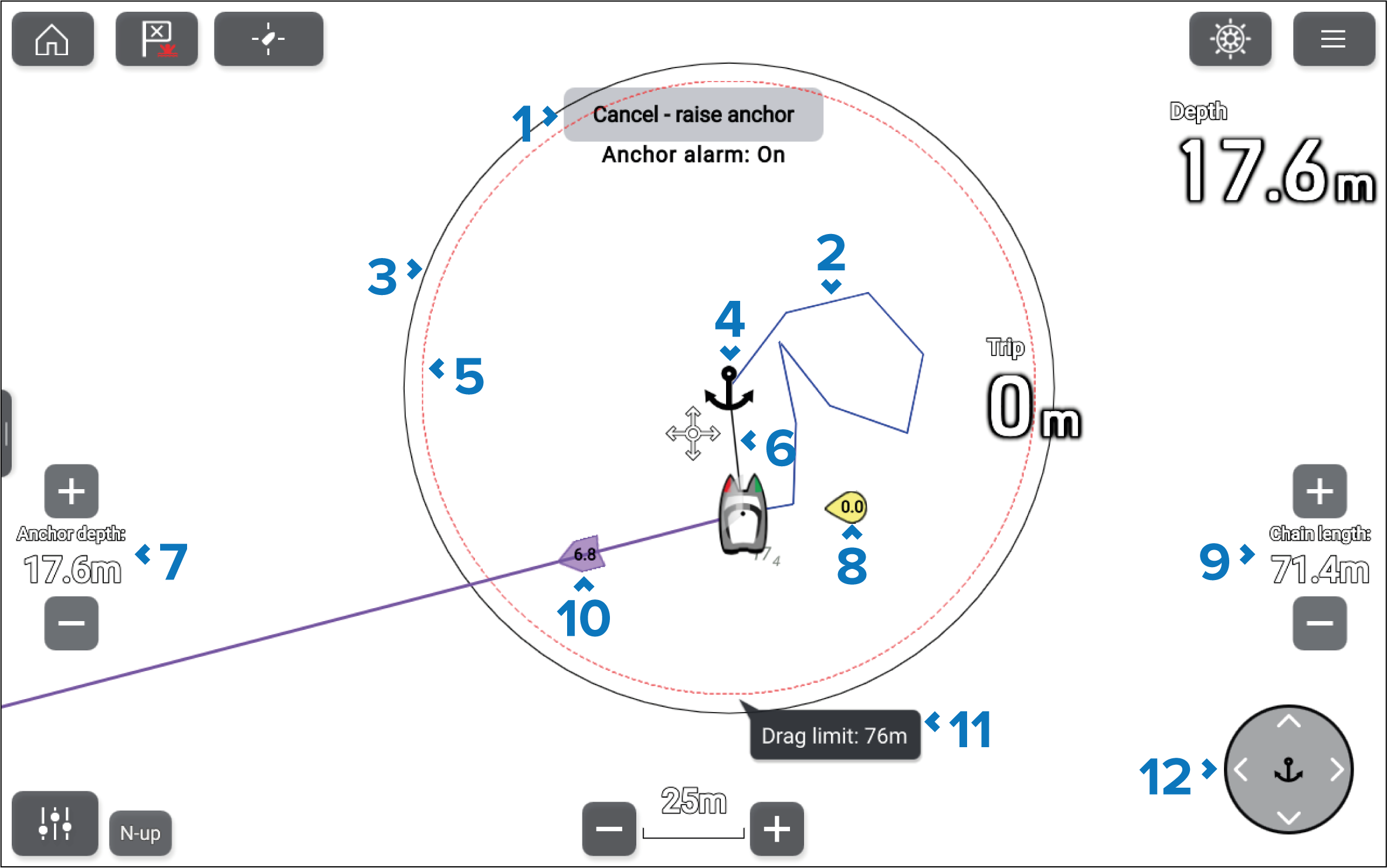
Cancel — raise anchor button — Cancels the anchor alarm. The status of the alarm is shown below the button.
Track line — Whilst the anchor alarm is active, a track line is recorded to show where your vessel has been.
NoteIf a track is already being recorded when anchor mode is activated, the current track is stopped and saved, and a new track starts recording automatically once anchor mode is deactivated.
Max swing radius circle — A circle with a solid black outline is placed around the anchor icon, which represents the maximum swing radius.
Anchor position — An anchor icon is placed at the GPS position at which your vessel was located when Drop anchor was selected in the Anchoring wizard.
Drag limit circle — A circle with a dashed red outline is placed around the anchor icon, representing the drag limit. The Anchor drag alarm is triggered when your vessel’s GNSS (GPS) receiver passes this line.
Anchor chain — A line is drawn between the anchor icon and the vessel icon to represent the anchor chain.
Anchor depth — The depth of the anchor. Use the + and - buttons to adjust the anchor depth.
Wind vector — Vector graphic indicating the wind speed and direction.
Chain length — The length of chain deployed. Use the + and - buttons to adjust the length.
Tide vector — Vector graphic indicating tide set and drift.
Drag limit value — Drag limit distance from anchor.
Anchor position controls — Use the directional controls to adjust the anchor’s position.