Handset controls
ControlsWireless handsetWired handsetRaymic
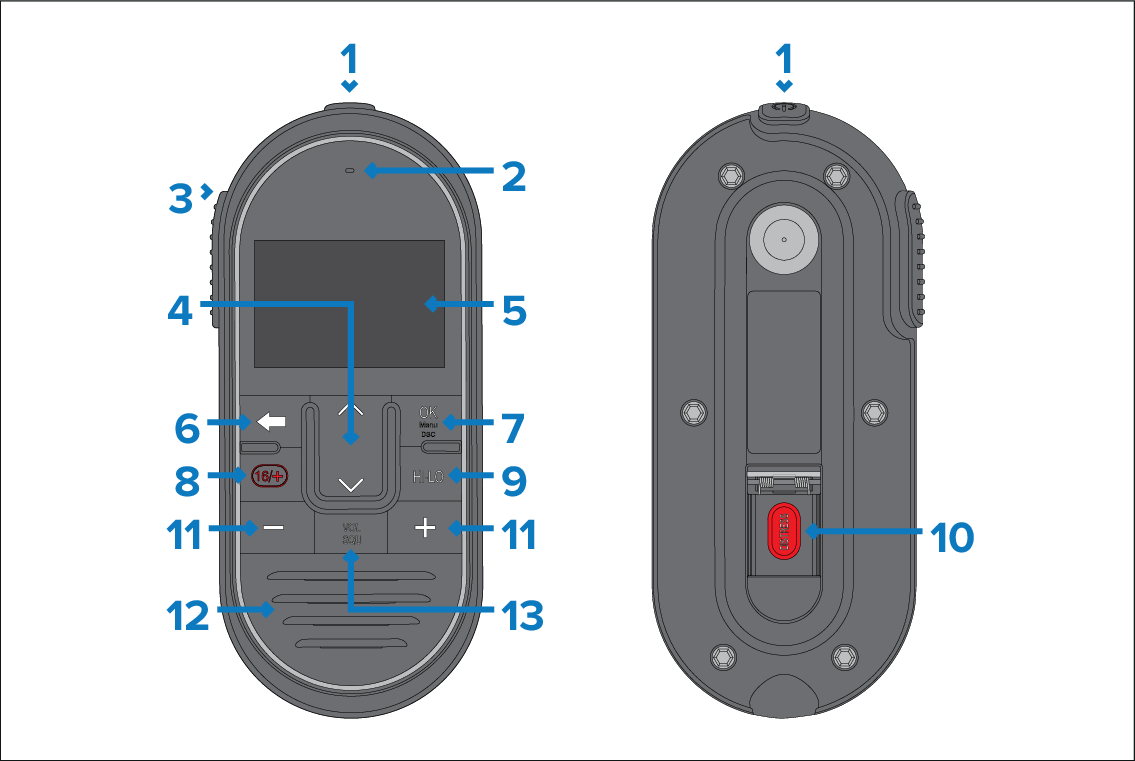
- Power — Press to power the handset on. Press and hold for 3 seconds to power the handset off. Momentary press to access the shortcut list.
Microphone location.
- PTT (Push to Talk) — Press and hold to send
a voice message. Release to return to receive mode.Note
The maximum transmit time is limited to 5 minutes to prevent unintentional transmissions from occupying the VHF channel.
Channel Up and Channel Down — Changes to the next or previous VHF channel, also used to select or adjust options in the menu.
LCD display.
Back — Go to the previous menu / screen. Press and hold to return to the Homescreen.
OK / menu button — Press button to access menu / DSC functions and to confirm selections.
16 / + — When powered on press to switch between priority channels.
HI/LO — Press to switch between High (25 W) and Low (1 W) transmit power.
DISTRESS — Lift up the spring-loaded cover and press this button to make a DSC distress call.
Volume Up and Volume Down — Press to adjust volume or squelch intensity up or down.
Built-in speaker.
VOL/SQ — Press button to switch between volume and squelch controls.