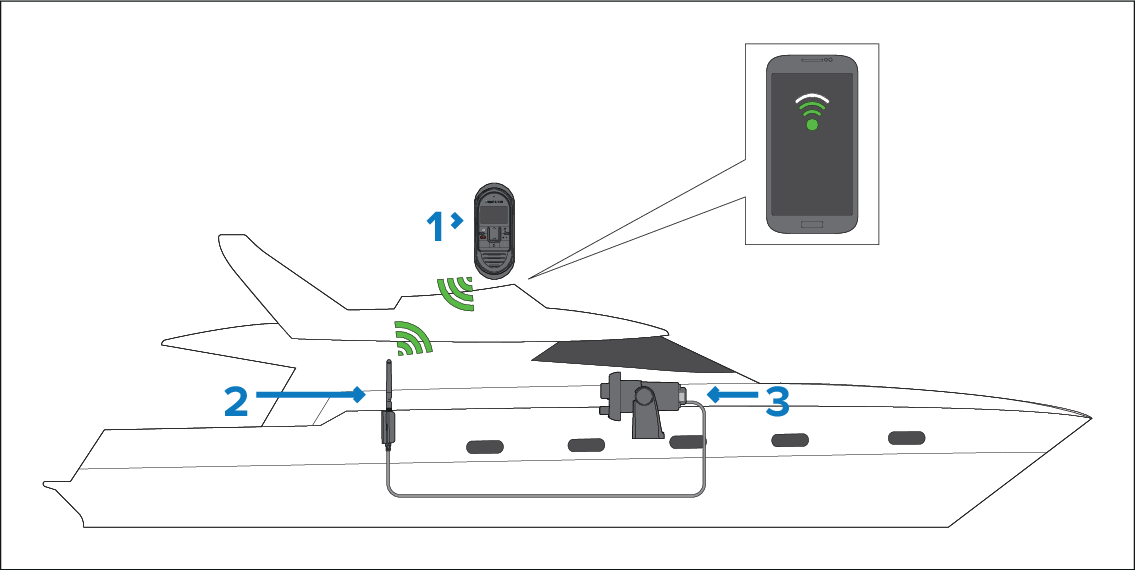
Before installing a wireless device, a site survey should
be performed to ensure the wireless signal strength at the desired
installation location is sufficient to maintain a reliable connection.
You can perform a site survey using your smartphone or tablet
and a wireless signal analyzer app, such as “Wi-Fi Analyzer” by Farproc
or similar.
WirelessSite surveyAnalyzerPre-installation
Description
1
Wireless handset
2
Wireless hub
3
VHF Radio
Install the wireless analyzer app on your smart device.
Connect the wireless hub to your VHF Radio.
Move the hub to its desired location.
The hub should be located as close to the desired location of
the wireless handset as possible. An additional wireless hub antenna
extension cable may also be required; this is available to order as
accessory A80541, and provides an additional 5 meters
of cable length.
Power on your VHF Radio.
Make a note of your wireless hub’s name (SSID).
The wireless hub’s name can be found using a wired handset: Menu > Set-up > Wireless set-up > Wireless hub set-up > Hub name. (By default the hub
name will be RM followed by the full part number and serial number
of the VHF Radio it is connected to, e.g.: RM E70517 107828).
Go to the location you have chosen for your wireless handset.
Open the wireless analyzer app on your smart device and
scan available networks.
Establish the signal strength of your hub’s wireless network
at the chosen location.
For reliable wireless performance the signal strength should
be better than –75dBm, the closer the signal is to zero the better
the wireless performance will be (e.g. –40dBm is better than –75dBm).
WirelessChannelIf the wireless channel your hub is using is congested with wireless
signals then change your hub’s wireless channel (Menu > Set-up > Wireless set-up > Wireless hub set-up > Wi-Fi channel), and select a
different wireless channel.
Try channels 1, 6 and 11 first as these are usually the preferred
wireless channels. Otherwise try the channel that has the least congestion.
If you have a very weak or intermittent signal then you
will need to investigate further, please refer to the wireless location
requirements to help establish what may be causing the problem.
Repeat steps 6 to 10 with each wireless handset you wish
to install.