Installing the wireless hub antenna extension accessory
An extension cable accessory (A80541) is available for the wireless hub’s antenna. Using the extension, the distance from the wireless hub’s antenna can be extended by an additional 5 m (16.4 ft).
Wireless hubAntenna extension
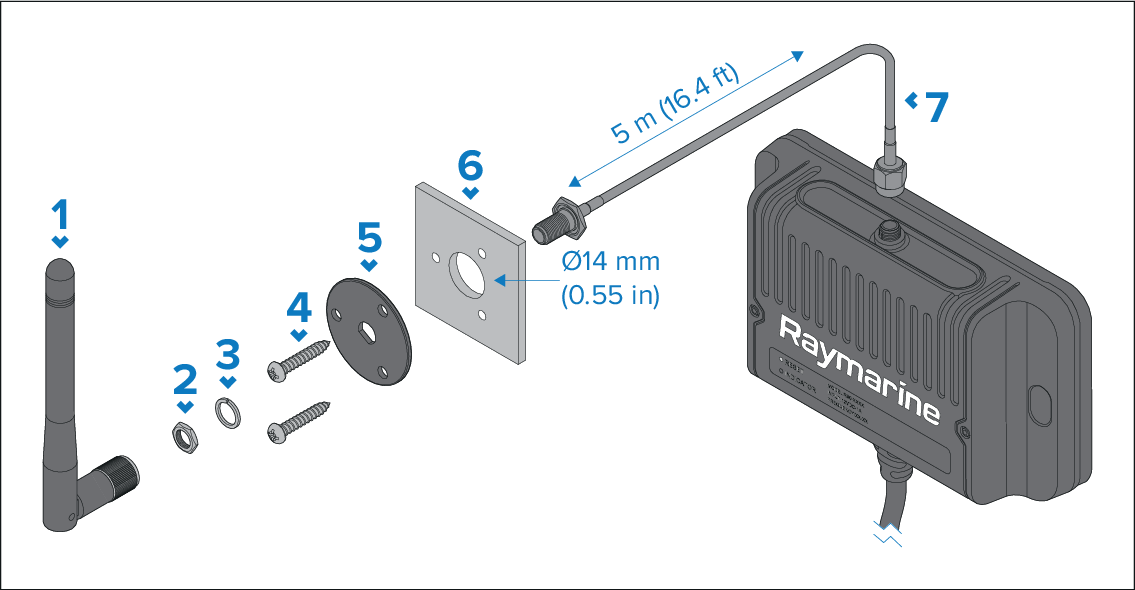
Description |
|
|---|---|
1 |
Antenna (supplied with the hub). |
2 |
Nut. |
3 |
M3x10 fixing screws x 3. |
4 |
Mounting plate. |
5 |
Mounting surface (14 mm (0.55 in) diameter hole required). |
6 |
5 m (16.4 ft) antenna extension cable. |
7 |
Split washer. |
8 |
Wireless hub. |
- Check the selected location for the Mounting plate, a clear flat area is required.
- Using a pencil, offer up the Mounting plate to the desired location and mark the location of the screw holes and the center hole on the mounting panel.
- Drill holes for the mounting fixings using a drill with a suitable sized drill bit.
- Drill the center hole using a 14 mm (0.55 in) drill/hole cutter.
- Pull the connector end with the exposed thread through the center hole.
- Place the mounting plate over the end of the connector.
- Place the split washer and nut over the end of the connector and secure by hand tightening the nut.
- Secure the mounting plate to the mounting surface using the supplied screws.
- Screw the antenna supplied with your hub to the connector.
- Connect the opposite end of the extension cable to the antenna connector located on the top of the wireless hub.