Homescreen overview
Homescreen
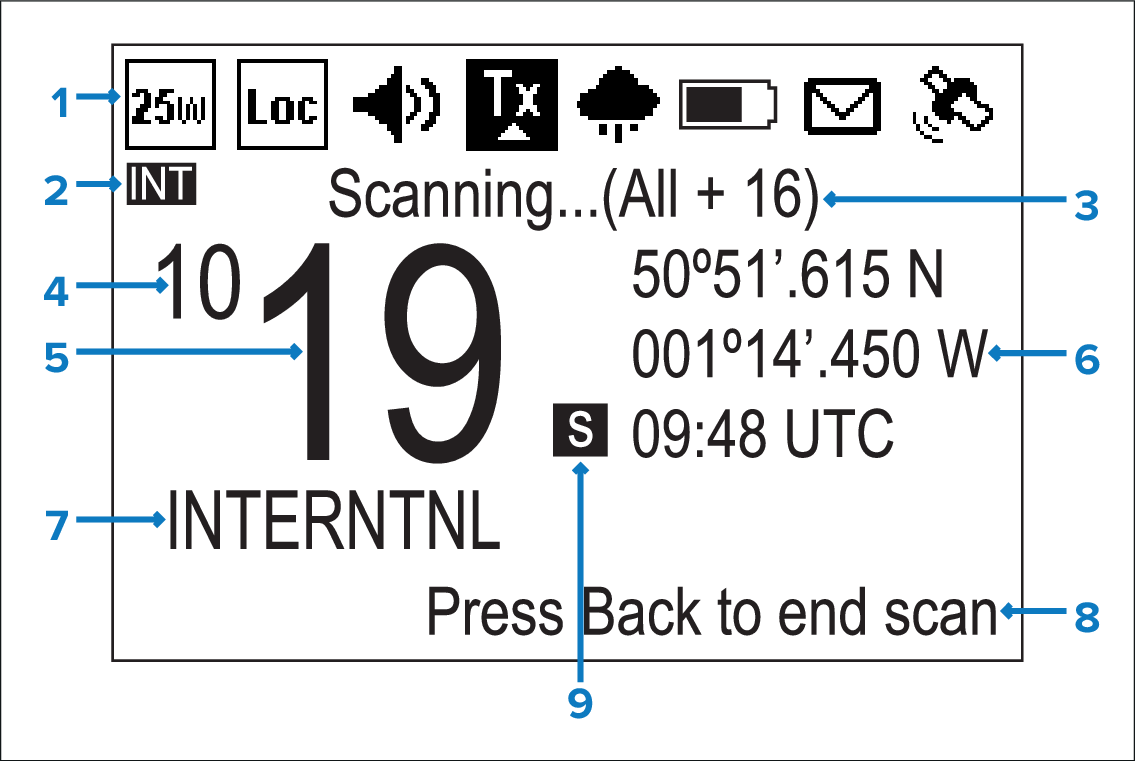
Status bar — The status bar displays symbols which indicate the current status of the unit.
Frequency band — Indicates which channel frequency band is in use:
USA — United States of America
INT — International
CAN — Canada
WX — Weather
NoteSpecial licensing is required to receive USA and Canadian channel sets.
Status text — Indicates the current radio mode e.g.: ATIS Mode active, Weather Alert, Scan mode etc.
New 4 digit channels — Identifies the first 2 digits when the radio is set to one of the new 4 digit simplex channels.
Channel — Indicates the current channel number, or the last 2 digits when set to a 4 digit channel.
Location / Time or Location / COG/SOG — Depending on selection displays Location coordinates and current time or Location coordinates and current COG and SOG.
Channel Name — Indicates the name of the current channel.
Optional text — Provides extra user guidance.
Channel type — Indicates the type of channel:
s = Simplex — Simplex channels transmit and receive on the same frequency.
d = Duplex — Duplex channels use separate frequencies to transmit and receive.