Display options
The following illustration shows the different options available for displaying the camera’s digital and analog video feeds.
Display options
All video feeds are available simultaneously.
For more information on the different video feeds available and their respective video formats, refer to: Video connections
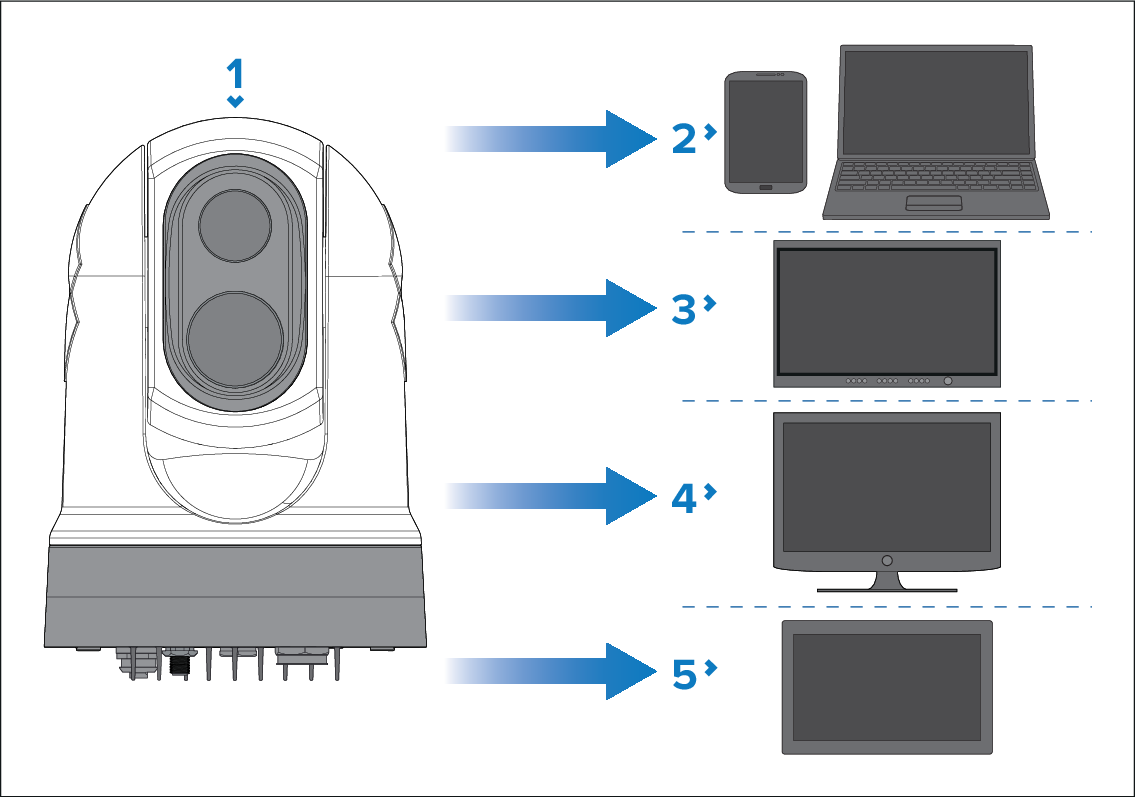
This illustration does NOT include any cables or accessories that may be required to connect the products shown. For more information on specific connections, refer to the Connections section.
Camera.
Laptop or another Ethernet device running a Web browser: via an Ethernet connection.
Digital video monitor: via an HD-SDI connection directly to the camera (or an HDMI connection via a converter, available separately from third-party retailers).
Analog video monitor: via a composite analog video connection available on the camera’s power cable.
Compatible MFD / chartplotter: via an Ethernet connection.
This product is ONVIF-compatible, and uses ONVIF (Profile S). ONVIF profiles help you to determine which IP digital video devices are compatible with one another. For more information on ONVIF profiles, refer to: www.onvif.org/profiles