Inserting the studs into the camera base
The supplied threaded studs are provided pre-coated with threadlocker. You may need to use the supplied flat nuts to assist you in winding the studs into the camera base.
Important
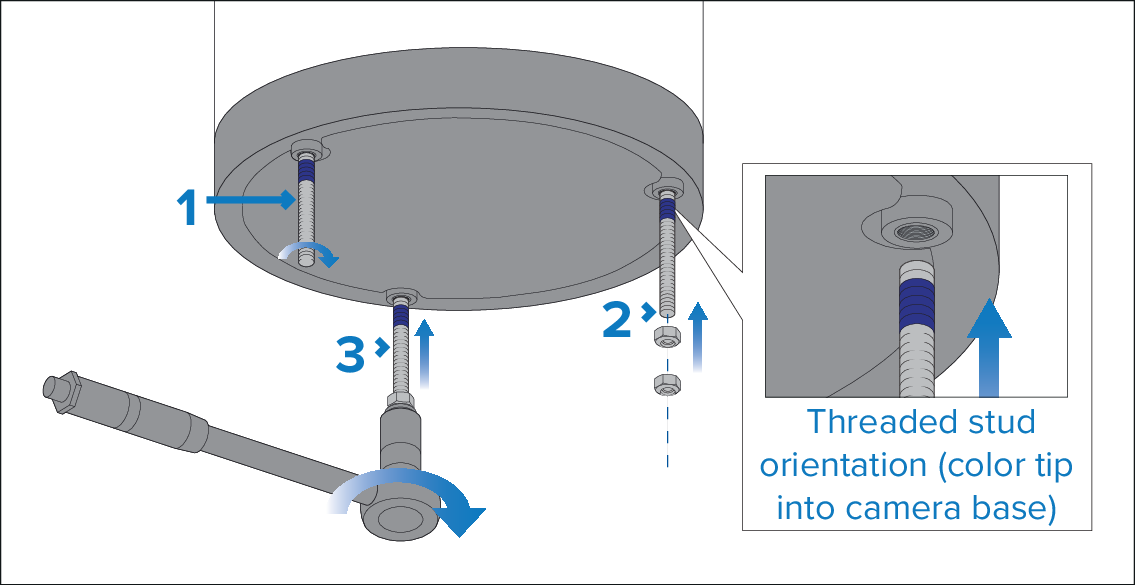
Before attempting to insert the supplied threaded studs into the camera base, ensure that the threaded studs are oriented so that the blue-colored end of each stud is inserted into the camera base (as illustrated above).
- Insert the blue-colored end of the stud into the camera base by hand, with just enough turns to prevent it falling out.
- Fit the 2 supplied flat nuts to the end of the stud, with just enough turns to secure the nuts.
- Using an M6 socket wrench or spanner, securely grip the lower flat nut and then wind the stud fully into the camera base mounting holes.
- Repeat steps 1 to 3 for each stud.
- Once all 3 studs are fully inserted into the camera base, remove and discard the flat nuts.